
Modifiers
We have seen earlier that custom layouts can be used to modify the appearance of a content item. You can create several layouts, exposed by different features across the application.
That is great for creating different layouts, but what if you want to apply the same visual behavior across all instances of a content item? That is where modifiers come in.
Modifiers allow you to attach a visual behavior to every instance of a content item, and you can configure that from the CMS with the corresponding implementation in Flutter.
Chain of Modifiers
Unlike layouts, there can be multiple modifiers for a content item. These can be applied as a chain with each modifier getting the output of the previous modifier.
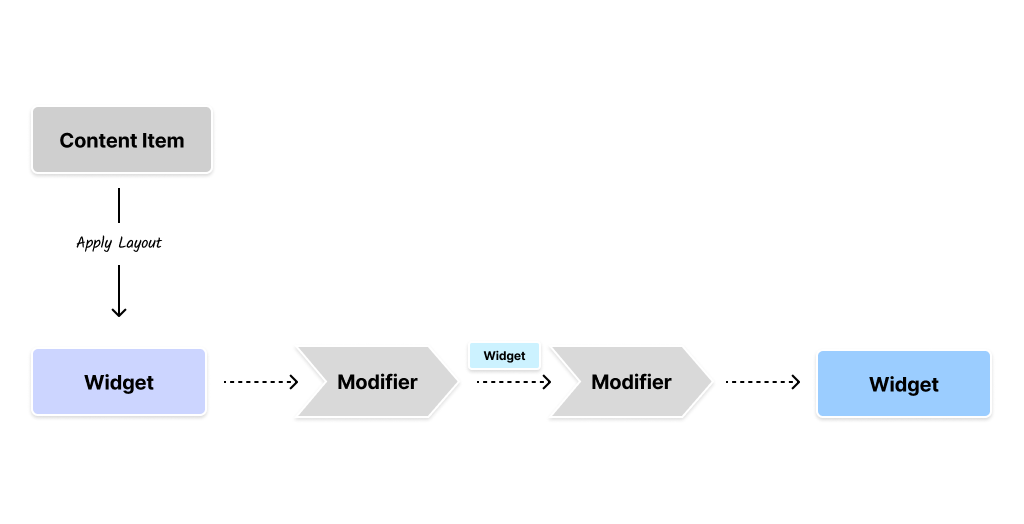
The input to the modifier is the output of the layout for the content item, which is a Widget. Each modifier can modify the Widget and pass it on to the next modifier in the chain. The output of the last modifier is the final Widget that is rendered on the screen.
Creative Combination
You can combine Modifiers, Dependency Injection, and Layouts to create sophisticated visual structures for your content items. The modifiers can construct a tree that leverages state management via DI, InheritedWidgets, custom layouts, and other Flutter features.
Implementing a Custom ThemeModifier
Flutter allows us to change the themes of certain widget trees by using a Theme widget at the right places. This is the perfect use case for a modifier that can wrap the layout widget for the content item with a Theme widget.
@JsonSerializable()
final class ThemeModifier extends ContentModifierConfiguration {
  static const schemaName = 'vyuh.content.modifier.theme';

  static final typeDescriptor = TypeDescriptor(
    fromJson: ThemeModifier.fromJson,
    schemaType: schemaName,
    title: 'Theme Modifier',
  );

  final ThemeMode mode;

  ThemeModifier({this.mode = ThemeMode.light})
      : super(schemaType: schemaName);

  factory ThemeModifier.fromJson(Map<String, dynamic> json) =>
      _$ThemeModifierFromJson(json);

  @override
  Widget build(BuildContext context, Widget child, ContentItem content) {
    final service = vyuh.di.get<ThemeService>();
    final themeData = service.theme(mode);

    return themeData != null
        ? Theme(data: themeData, child: child)
        : child;
  }
}
This modifier takes a ThemeMode as input and wraps the child widget with a Theme widget. It leverages Dependency Injection to fetch the ThemeService that provides the ThemeData object.
CMS Configuration
On the CMS side, configure the theme modifier with the available modes:
import { defineType } from 'sanity'
import { FaPalette as Icon } from 'react-icons/fa6'

export const themeModifier = defineType({
  name: 'vyuh.content.modifier.theme',
  type: 'object',
  title: 'Theme',
  icon: Icon,
  fields: [
    {
      name: 'mode',
      title: 'Mode',
      type: 'string',
      initialValue: 'light',
      options: {
        list: [
          { title: 'Light', value: 'light' },
          { title: 'Dark', value: 'dark' },
          { title: 'System', value: 'system' },
        ],
      },
    },
  ],
})
Include this in the CMS FeatureDescriptor:
export const system = new FeatureDescriptor({
  name: 'system',
  title: 'System',
  contentModifiers: [themeModifier],
})
Flutter Configuration
On the Flutter side, include the modifier in the FeatureDescriptor:
final feature = FeatureDescriptor(
  name: 'system',
  title: 'System',
  icon: Icons.hub,
  init: () async {
    vyuh.di.register(ThemeService());
  },
  extensions: [
    ContentExtensionDescriptor(
      contentModifiers: [
        ThemeModifier.typeDescriptor,
      ],
    ),
  ],
);
In Action
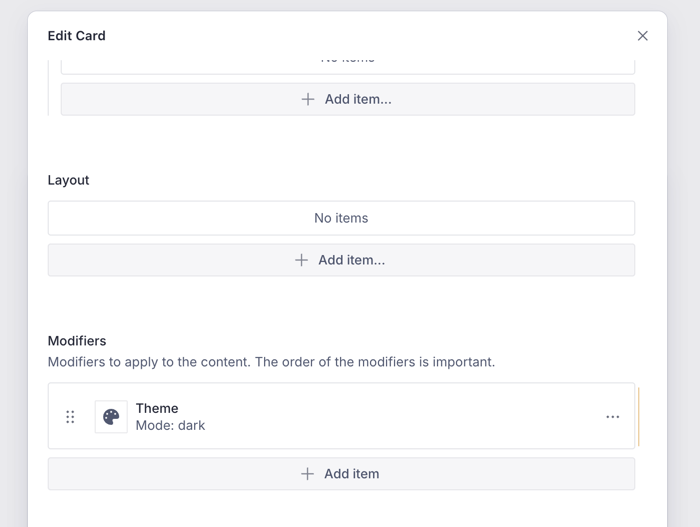
You can see the configuration for the ThemeModifier in the CMS. In this case, we are changing the theme of a Card to a dark theme.
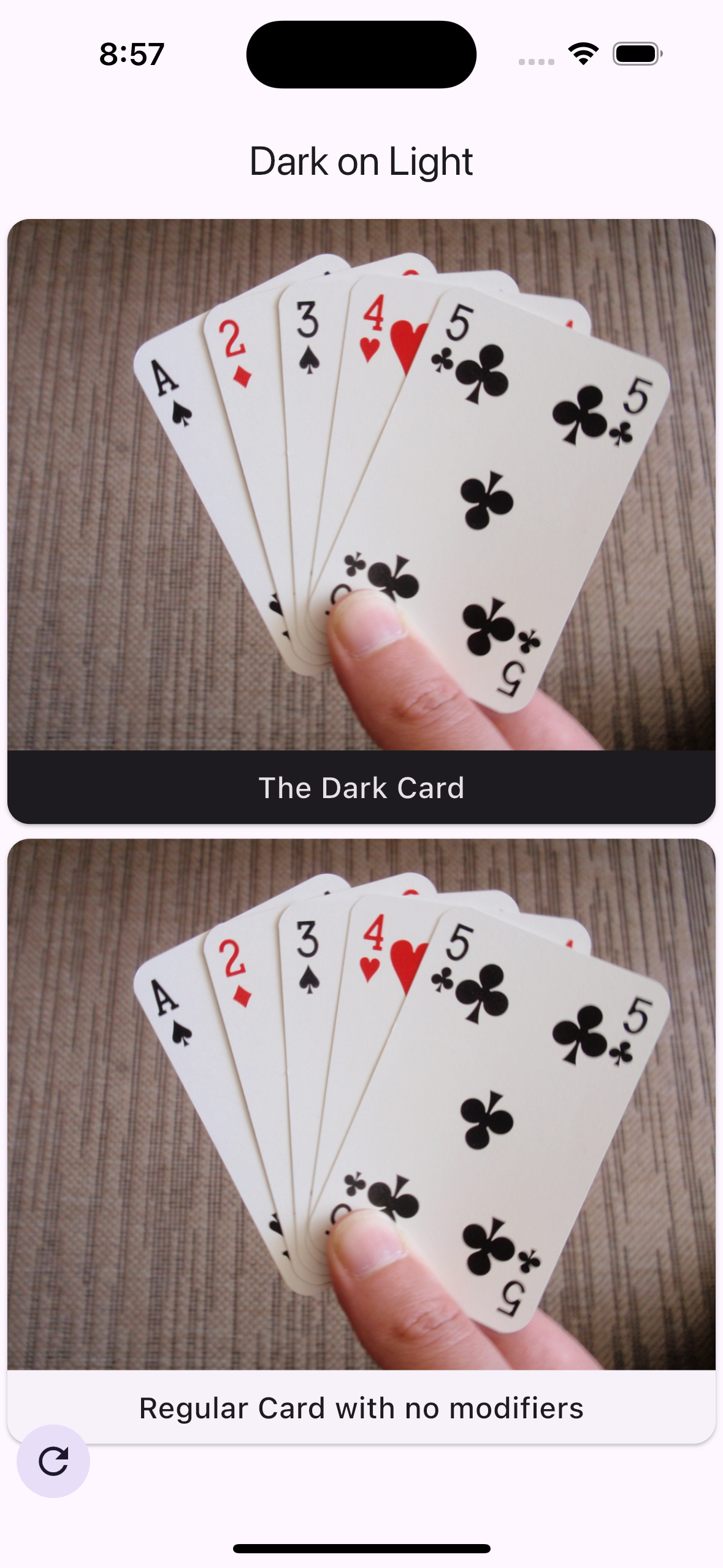
While the rest of the app might be using a light theme, this content item will always render with a dark theme.
Summary
Modifiers are a powerful way to apply a visual behavior to a content item. They can be chained together to create a rich visual experience. You can use them to apply a theme, localization, or any other visual behavior.
Modifiers can be configured from the CMS and applied to content items in Flutter, which reduces the amount of custom widget code you need to write.