
Food
The Food example demonstrates how to build a restaurant menu application as a self-contained Vyuh feature. It covers the essentials of defining custom content types, wiring up CMS-driven routes, and letting content editors manage the menu without requiring an app release.
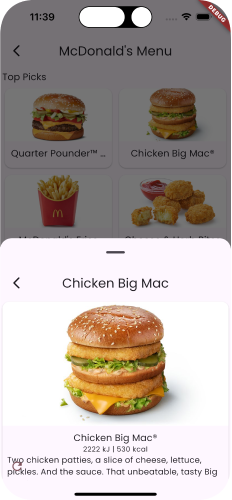
What This Demonstrates
This example walks through several foundational concepts of the Vyuh Framework:
- Custom content types -- Defining a
FoodMenuItemthat maps a CMS schema to a Dart class, complete with typed fields for title, description, price, image, and category. - CMS-driven routes with
CMSRoute-- Declaring routes whose content is fetched from the CMS at runtime rather than hardcoded in the app. - API content for fetching data -- Retrieving structured menu data from Sanity and deserializing it into strongly-typed Dart objects.
- Feature composition with
ContentExtensionDescriptor-- Registering content builders so the framework knows how to construct and render each content type.
The Feature
Every Vyuh feature starts with a FeatureDescriptor. This is the entry point that declares the feature's routes, content types, and any initialization logic.
final feature = FeatureDescriptor(
  name: 'food',
  title: 'Food',
  description: 'A restaurant menu feature',
  icon: Icons.restaurant,
  routes: () async => [
    CMSRoute(
      path: '/food',
      routes: [CMSRoute(path: ':path(.*)')],
    ),
  ],
  extensions: [
    ContentExtensionDescriptor(
      contentBuilders: [
        FoodMenuItem.contentBuilder,
      ],
    ),
  ],
);
A few things to note:
CMSRoutetells the framework that the content for this route is managed in the CMS. When a user navigates to/food, the framework fetches the corresponding page document from Sanity and renders it.- The wildcard sub-route
:path(.*)handles any nested CMS paths beneath/food. This means content editors can create arbitrarily deep page hierarchies in the CMS and the app will serve them without code changes. ContentExtensionDescriptorregisters theFoodMenuItemcontent builder so the framework can match incoming JSON to the correct Dart type and select an appropriate layout.
Custom Content Type
The FoodMenuItem class is the Dart counterpart of the CMS schema. It extends ContentItem, which gives it a schema type identifier and optional layout configuration.
@JsonSerializable(createToJson: false)
final class FoodMenuItem extends ContentItem {
  static const schemaName = 'food.menuItem';
  static final typeDescriptor = TypeDescriptor(
    schemaType: schemaName,
    title: 'Food Menu Item',
    fromJson: FoodMenuItem.fromJson,
  );

  final String title;
  final String? description;
  final double price;
  final ImageReference? image;
  final String category;

  FoodMenuItem({
    required this.title,
    this.description,
    required this.price,
    this.image,
    required this.category,
    super.layout,
  }) : super(schemaType: schemaName);

  factory FoodMenuItem.fromJson(Map<String, dynamic> json) =>
      _$FoodMenuItemFromJson(json);
}
Key details:
schemaName(food.menuItem) must match the_typefield in the CMS schema exactly. This is how the framework links JSON documents to the correct Dart class.TypeDescriptorbundles the schema type, a human-readable title, and thefromJsonfactory together. The framework uses this descriptor when it encounters a JSON object with a matching_type.@JsonSerializable(createToJson: false)usesjson_serializablefor deserialization only, since content flows one way -- from the CMS to the app.- Fields like
imageuseImageReference, a Vyuh type that handles CMS-managed image assets.
CMS to Flutter Flow
Understanding how content travels from the CMS to a rendered widget is central to working with Vyuh. Here is the pipeline for the Food example:
Schema definition -- Content types such as
food.menuItemare defined as schemas in Sanity. These schemas describe the fields, validation rules, and relationships that editors work with.Content creation -- Editors use the Sanity Studio to create and manage menu items. They fill in titles, descriptions, prices, images, and categories using a structured editing experience.
JSON fetching and deserialization -- When a user navigates to a food route, the framework fetches the page document from Sanity. Each content block in the response carries a
_typefield. The framework matches this type to the registeredTypeDescriptorand callsFoodMenuItem.fromJsonto produce a typed Dart object.Layout selection and rendering -- The
ContentBuilderforFoodMenuIteminspects thelayoutproperty (which can also be set from the CMS) and selects the appropriate widget to render. This means the same content type can be presented in different visual styles without changing the underlying data.
Key Takeaways
- Custom content types map CMS schemas to Dart classes. The
schemaNameacts as the bridge between a JSON document in Sanity and a typed object in Flutter. CMSRouteenables server-driven navigation. Routes and their content are defined in the CMS, so the app's page structure can evolve without code changes.- Content editors can update the menu without app releases. New items, price changes, or seasonal specials can all be published from the CMS Studio and reflected in the app immediately.
- The same content type can have multiple visual layouts. By assigning different layouts in the CMS, editors control how a menu item appears -- as a card, a list tile, a detail page -- without developer involvement.
Read the Code
See the code for the example on GitHub: Food