
Puzzle
A fun example where we create a puzzle game with the levels controlled from the CMS. This demonstrates how Vyuh can power interactive experiences like games, where the content (puzzle levels, difficulty settings) is managed externally while the game logic stays entirely in Flutter.
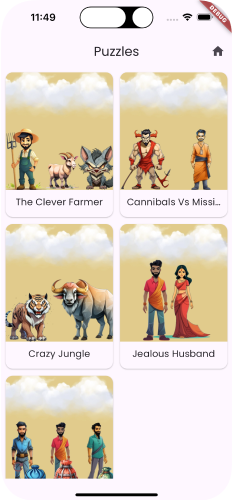
What This Demonstrates
This example highlights several important capabilities of the Vyuh Framework:
- CMS-driven game content -- Puzzle levels, including grid size, target images, and difficulty, are defined as structured content in the CMS. New levels can be added or reordered without touching any code.
- Complex state management with MobX -- The game tracks moves, timing, completion status, and player progress using MobX observables, providing reactive UI updates as the game state changes.
- Custom content types for game data -- The puzzle level is modeled as a custom
ContentItem, showing how Vyuh content types extend beyond typical text and media into structured game data. - Feature with both CMS routes and client-side logic -- The feature combines CMS-managed routes for level selection with rich client-side game logic for the puzzle interactions, animations, and scoring.
The Feature
The Puzzle feature is set up with a FeatureDescriptor that registers the CMS routes for browsing and selecting levels, along with a content extension for the custom LevelSection content type.
final feature = FeatureDescriptor(
  name: 'puzzles',
  title: 'Puzzles',
  description: 'A puzzle game with CMS-driven levels',
  icon: Icons.extension,
  routes: () async => [
    CMSRoute(
      path: '/puzzles',
      routes: [CMSRoute(path: ':path(.*)')],
    ),
  ],
  extensions: [
    ContentExtensionDescriptor(
      contentBuilders: [
        LevelSection.contentBuilder,
      ],
    ),
  ],
);
The route structure uses a wildcard pattern (:path(.*)) so that any nested path under /puzzles is resolved from the CMS. This lets content editors define the full navigation hierarchy for the puzzle experience, including category pages, level listings, and individual level details.
Game Content from CMS
Puzzle levels are defined as structured content in the CMS. Each level specifies properties like the grid size, target image, and difficulty. Content editors can add new levels, reorder them, or adjust difficulty settings at any time -- without requiring a code change or app update.
A simplified version of the LevelSection content type looks like this:
@JsonSerializable(createToJson: false)
final class LevelSection extends ContentItem {
  static const schemaName = 'puzzles.levelSection';

  final String title;
  final int gridSize;
  final ImageReference? image;
  final String difficulty;

  // ...constructor and fromJson...
}
The LevelSection extends ContentItem, making it a first-class content type in Vyuh. When the CMS delivers this content, Vyuh automatically deserializes it and hands it off to the registered content builder, which renders the puzzle grid and game UI.
This means that the game's level catalog is entirely CMS-managed. A content editor could, for example, create a seasonal set of holiday-themed puzzles, set them to go live on a specific date, and remove them afterwards -- all without involving a developer.
State Management
The puzzle game state -- current level, number of moves, timer, and completion status -- is managed using MobX observables. This gives the game UI reactive updates: as tiles move, the move counter increments instantly; when the puzzle is solved, the completion state triggers the success animation.
MobX is a natural fit here because game state changes frequently and from multiple sources (user gestures, timer ticks, level resets). Observables ensure that only the parts of the UI affected by a particular state change are rebuilt, keeping the game performant even with complex animations and transitions.
The game store tracks player progress across levels, allowing the UI to show which puzzles have been completed and what scores were achieved.
Key Takeaways
- Game content (levels, configurations) can live in the CMS. This separates the creative work of designing levels from the engineering work of building the game engine.
- Complex client-side logic (game engine, animations) stays in Flutter. The CMS provides the data; Flutter provides the interactive experience.
- Content editors can create new puzzle levels without developer involvement. Adding a new level is as simple as filling out a form in the CMS.
- MobX handles reactive game state elegantly. Observables and reactions make it straightforward to keep the game UI in sync with rapidly changing state.
Read the Code
See the code for the example on GitHub: Puzzle