
Overview
The Vyuh Framework structures Flutter apps as a composition of Features and Plugins, driven by content from a headless CMS. Instead of monolithic codebases, apps are assembled from independent modules that expose content blocks to the CMS and render them in Flutter. This section covers the architectural concepts, extension mechanisms, and terminology that underpin every Vyuh app.
What You'll Learn
- Features and Plugins -- the two building blocks of every Vyuh app
- Descriptors and Builders -- the extension mechanism that connects CMS content to Flutter widgets
- Content blocks -- the modular, CMS-managed units that replace hard-coded screens
- The separation of concerns between business configuration (CMS) and implementation (Flutter)
Learning Path
Read the concepts in this order for the best understanding:
- Features & Plugins -- building blocks of a Vyuh app
- Descriptors & Builders -- extensibility mechanism
- Glossary -- reference for all framework terminology
Shape of a Vyuh App
A Vyuh app is bootstrapped with a single runApp() call that declares its features and plugins:
import 'package:vyuh_core/vyuh_core.dart' as vc;

void main() async {
  vc.runApp(
    initialLocation: '/',
    features: () => [
      // Features assembled here
      counterFeature,
      authFeature,
    ],
    plugins: PluginDescriptor(
      content: SanityContentProvider(...),
      analytics: AnalyticsPlugin(providers: [...]),
      auth: FirebaseAuthPlugin(),
    ),
  );
}
Features are user-facing modules (authentication, search, payments). Plugins provide cross-cutting infrastructure (analytics, networking, storage) available to all features.
Divide and Conquer
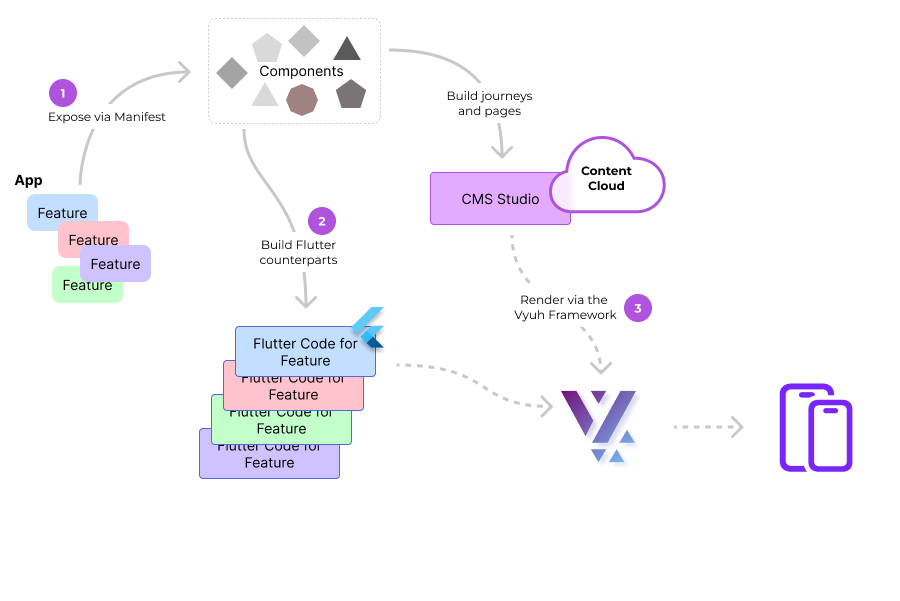
The CMS and Flutter each handle a distinct responsibility:
- CMS -- business teams compose pages, navigation, and content using high-level semantic blocks. No pixel-level design decisions are exposed here.
- Flutter -- engineering teams implement the rendering, business logic, and design system for each block.
The framework bridges both sides: it parses the CMS JSON payload and resolves each block to its corresponding Flutter widget through a type-safe registry of builders.
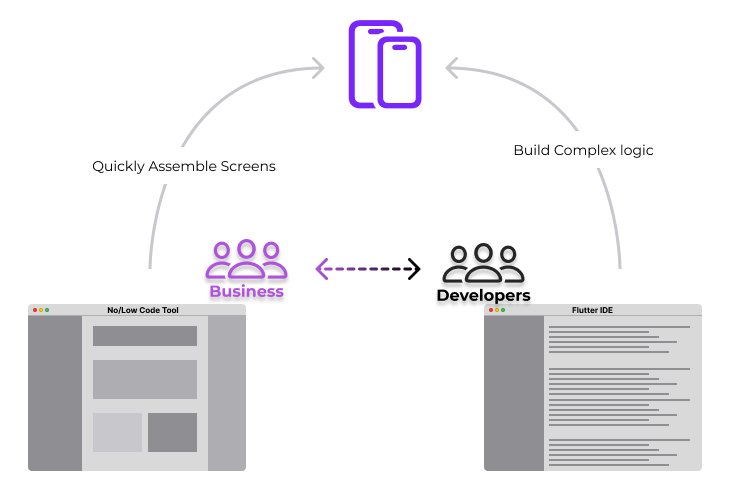
This separation gives business teams a no-code interface for managing app experiences while engineering retains full control over implementation in Dart and Flutter.
Core Capabilities
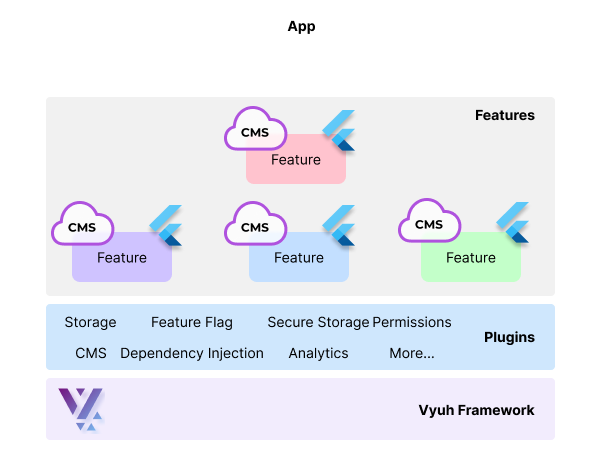
The framework provides the following capabilities out of the box:
- Modular features -- each feature is an independent package that can be developed, tested, and transferred between Vyuh apps
- CMS-driven navigation -- routes and page content are controlled from the CMS, enabling dynamic user journeys and A/B testing
- Conditional content -- content visibility and routing can be controlled by runtime conditions (platform, auth state, feature flags)
- Plugin system -- analytics, authentication, storage, networking, and dependency injection are all pluggable
- Design system focus -- components are built as part of a design system from day one
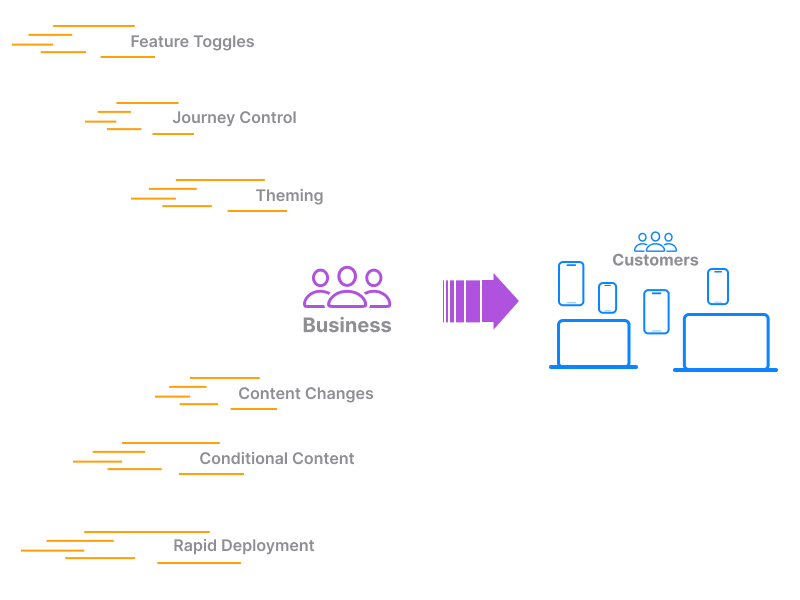
Traditional vs Vyuh Approach
| Aspect | Traditional Flutter | Vyuh Framework |
|---|---|---|
| Structure | Monolithic single codebase | Modular, feature-based packages |
| Content Management | Static, hard-coded within the app | Dynamic, managed via external CMS with content blocks |
| User Journeys | Fixed, hard-coded in the app | Dynamic, controlled through CMS |
| Modularity | Requires deliberate effort to split into packages | Built-in through reusable features and blocks |
| Flexibility | Requires redeployment for updates | Real-time updates through CMS |
| Exploration | Requires code changes to try different variations | Real-time changes and variant switching with live preview |
| Team Coordination | High, to ensure minimal impact of changes across shared code | Low, since features are developed independently |
Mindset for Building with Vyuh
Adopting Vyuh requires shifting from screen-centric thinking to block-centric thinking:
- Modular design -- treat each feature as an independent mini-app that exposes content blocks, not pre-defined journeys
- Dynamic content management -- design blocks to adapt to CMS changes without code modifications
- Separation of concerns -- the CMS is the source of truth for content structure and navigation; Flutter owns presentation and logic
- Configuration vs implementation -- CMS schemas capture business-level configuration only; implementation details stay in Flutter code
- Reusability -- design blocks for reuse across features and across different apps in a product family
Concept Pages
Features & Plugins
The two building blocks of every Vyuh app: features encapsulate user-facing functionality, and plugins provide cross-cutting infrastructure.
Descriptors & Builders
The extension mechanism that connects CMS content schemas to Flutter widgets through type-safe descriptors and builders.
Glossary
Reference definitions for all Vyuh Framework terminology including routes, conditions, actions, layouts, modifiers, and more.
For framework terminology, see the Glossary. To start building, head to the Quick Start guide.